 next to the field.
This page is designed to help with navigation between
quoting pages as well as provide helpful hints for each page.
If you need help on a particular field, click on
next to the field.
General Navigation Tips
New Browser Windows
A new browser window is created to process endorsement transactions. The original FAO browser will remain open to provide access to Policy Summary or for accessing other areas of the FAO application.
Continue Buttons
Each page has a  button at the bottom of the screen to assist in completing the quote. The
"Continue" button should be used when you want to advance to the next quoting
page. Selecting the "Continue" button will cause the next quoting page to
appear.
button at the bottom of the screen to assist in completing the quote. The
"Continue" button should be used when you want to advance to the next quoting
page. Selecting the "Continue" button will cause the next quoting page to
appear.
Tabs 
A tab near the top of the page represents each page. These tabs are preferred instead of the browser Back and Forward buttons for navigating between pages because they move directly to the requested page instead of displaying each page along the path. The tab for the current page is denoted by the white background and the blue arrow. The tab will remain visible so you can go back and forth between tabs within the endorsement.
Errors
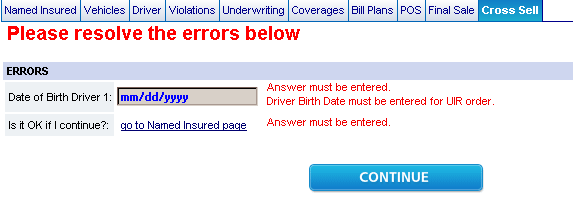
If you attempt to go to view Coverages or any tab after Coverages by using the "Continue" button or by clicking on a tab and a data error exists, the Error page will display with error messages. A descriptive message will appear if data is entered incorrectly or missing, and you will be able to correct the error on the screen. In certain cases, a link will appear to return you to the page where the information is incorrect or missing.
Dialogs
Several areas of data collection use what is called a
Dialog Box. To open the Dialog Box, click on the  button to the right hand side.

In the Dialog Box you may have several choices. To
remove incorrect information, use the  button. To exit out of the Dialog Box use the
button.
button. To exit out of the Dialog Box use the
button.
Processing the Endorsement
To process or complete the endorsement transaction, use the
 button
on the Finish page. This will upload the endorsement and
provide you with a confirmation number.
button
on the Finish page. This will upload the endorsement and
provide you with a confirmation number.